

Pick your story. Bring your team. Compare room themes, understand the session, and choose a time for your group. The main action is “Choose a room”. Supporting sections cover Theme comparison, Group-size pricing, Before you arrive.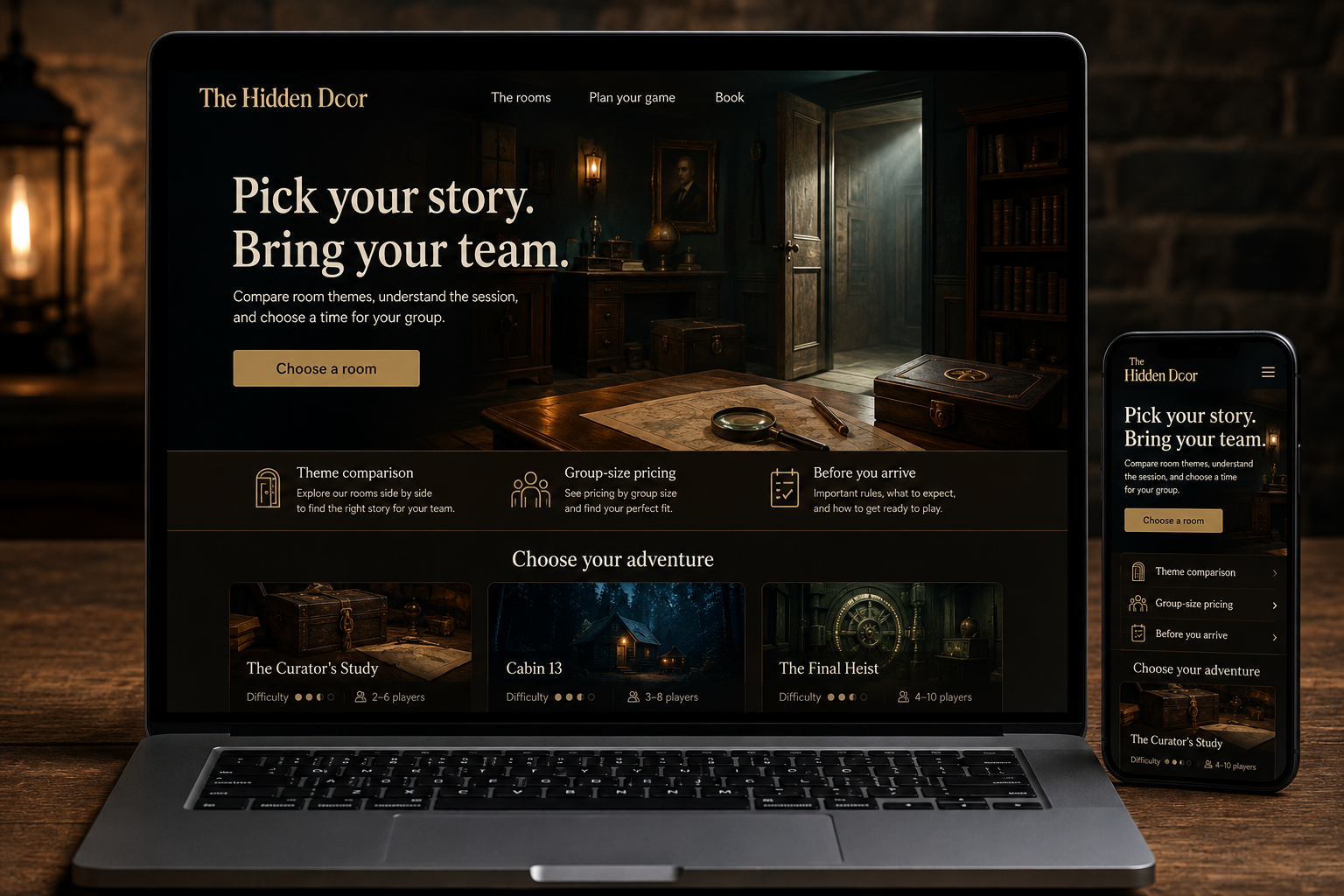
Explore this layout
An escape room website has to create intrigue without making the booking itself a puzzle. Groups need to know which game suits them, how many people can play, and what the session involves. A dramatic theme can invite exploration, but practical information should remain readable and easy to compare. The mystery belongs inside the experience, not around prices or arrival instructions.
Describe the theme without spoilers
Give each game a short premise and explain the style of experience, such as observation-led puzzles or a theatrical setting. Show approved photographs that convey atmosphere without exposing solutions. Label any fictional story clearly within the context of the game. Describe the nature of participation in useful terms instead of relying on a difficulty number alone. A first-time group needs to understand whether the game expects specialist knowledge or teaches everything within the experience.
Help the group judge suitability
State player limits, age arrangements, session duration, and whether bookings are private or shared. Explain physical elements, lighting, sound, or other features that may affect a guest's decision using accurate information from the operator. Provide a clear route for individual questions. Avoid broad assurances that a game suits everyone. The group organizer often books for several people and needs enough detail to check preferences before choosing a time.
Make the reservation arithmetic obvious
Show how the price changes with participant count and keep the selected game, date, time, and group size visible through checkout. Distinguish game duration from the total visit length including briefing. Explain arrival expectations and the actual change or cancellation conditions before confirmation. If larger groups require multiple rooms, offer a separate inquiry route. Customers should not have to book several unrelated slots and hope the operator can coordinate them afterward.
Encourage return visits through useful comparisons
A comparison page can help previous players choose a different theme or experience style. Clearly mark completed or retired games and link to current availability. Measure game-page visits, booking starts, and completed reservations, then review questions about group size or shared sessions. Use those questions to improve the comparison rather than adding more dramatic copy. The best promotional content helps the organizer choose an experience their group will be comfortable joining.
Before you launch
- State private versus shared sessions
- Show total visit time
- Keep group pricing visible
- Describe relevant sensory and physical features
Should a difficulty rating be the main comparison tool?
Use it as one element, with a clear explanation of what the rating means. Groups also care about theme, reading, physical participation, and whether help is available. Those details often predict a comfortable choice better than a single score that different players interpret differently.